
Why a Space in a URL Can Silently Break Your API. A Practical Guide to Percent Encoding for Backend Developers
A production-incident framing of URL encoding, covering why percent encoding exists, where developers get it wrong, and how query string encoding differs from path encoding.
 By Muhammad Zeeshan~5 min read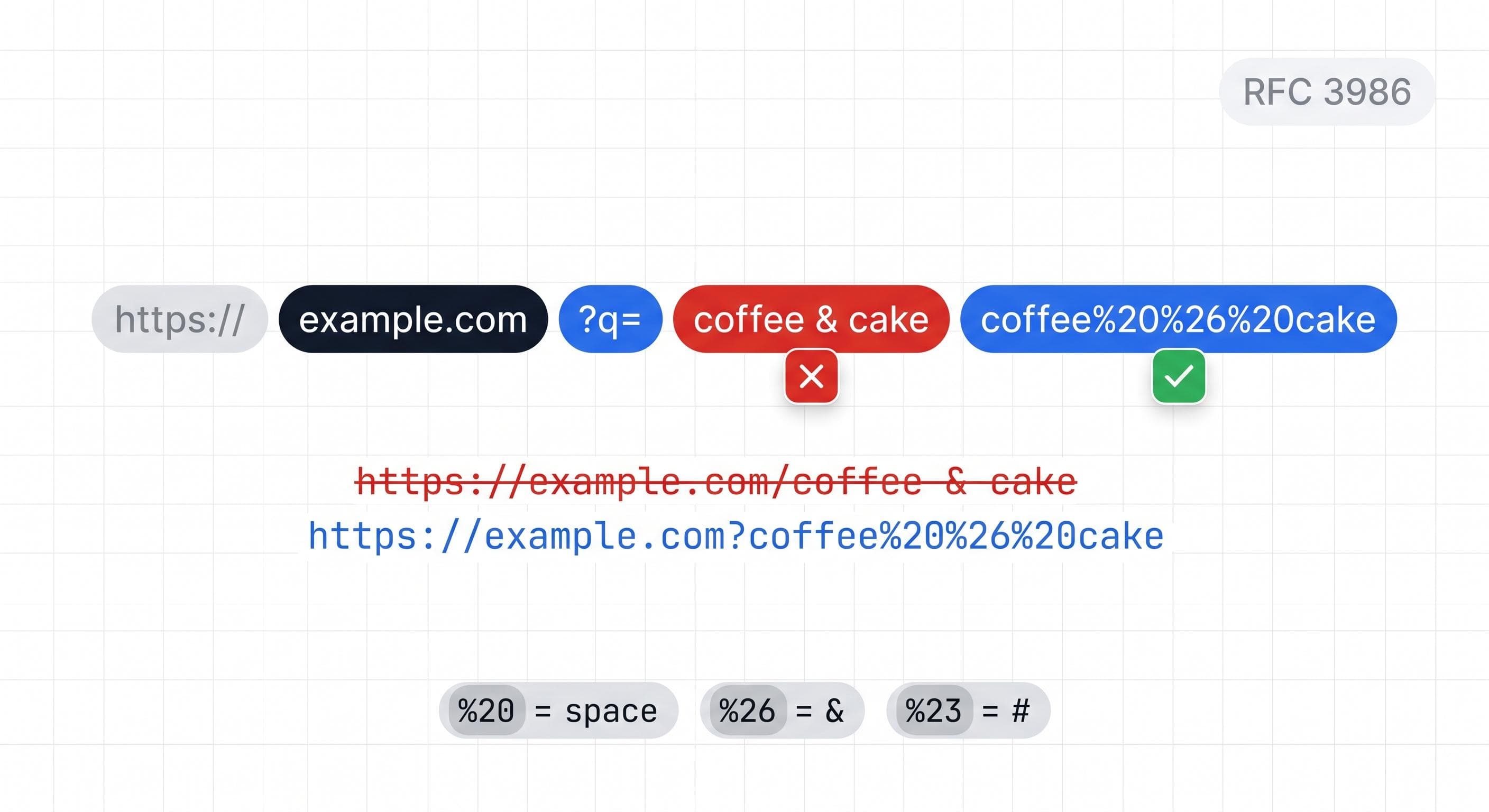
A support ticket arrived at a SaaS company: search results for any query containing an ampersand always returned empty. The developer who investigated assumed the API was broken. The endpoint was correct, the auth header was correct, and the server was returning a 200 with an empty results array rather than an error.
The HTTP access logs told a different story. The request URL showed two query parameters where there should have been one. q=coffee and cake=undefined. The user had searched for "coffee & cake". The client was building the query string by concatenating strings without percent encoding the value. An ampersand in the search term became an ampersand in the URL, which is a query string separator, not part of a value.
Zero results. No error. Classic URL encoding bug, and it took two hours to find.
Reserved Characters
RFC 3986 divides URL characters into two groups. Unreserved characters can appear anywhere in a URL without encoding: letters, digits, -, ., _, and ~. Reserved characters carry structural meaning and must be encoded when they appear as literal values inside a URL component.
The structural characters you'll hit most often in query strings:
&separates query parameters. In a value it must be%26.=separates keys from values. In a value it must be%3D.#ends the URL and begins the fragment identifier. In a value it must be%23.+means a literal plus or, in form encoding, a space. In a value outside form encoding it must be%2B.
Percent encoding replaces a character with a % followed by two hexadecimal digits representing the character's UTF-8 byte value. A is %41. Space is %20. An ampersand is %26. The decoding reverses this exactly.
The Space Problem
Spaces cause the most encoding bugs because they can be encoded two ways, and the difference is not obvious.
%20 is the correct percent-encoded form of a space. It works in paths, query strings, and fragment identifiers.
+ represents a space only in application/x-www-form-urlencoded format, the encoding HTML forms use when submitted. Outside that specific context, + is a literal plus sign. A URL you construct in JavaScript code is not form-encoded unless you explicitly format it that way.
The confusion persists because many web frameworks decode both %20 and + as spaces in query parameters, which trains developers to treat them as equivalent. They're not. Build URLs in code, and spaces should be %20. Use + for spaces only when you're explicitly producing form-encoded data.
The symptom of mixing them: values arrive on the server with literal plus signs instead of spaces, or values double-encode to %2B20, or values decode correctly in one framework and incorrectly in another.
encodeURI vs encodeURIComponent
JavaScript ships with two encoding functions. They do different jobs and can't be swapped.
encodeURI is for encoding a complete URL. It preserves every character that's valid anywhere in a URL, including structural characters like /, ?, &, =, and #. Running encodeURI on a query string value doesn't encode & or =. That's by design, but it's completely wrong for encoding values.
encodeURIComponent is for encoding a single value within a URL component: a query parameter value, a path segment, a hash value. It encodes everything except unreserved characters. An & becomes %26, / becomes %2F, = becomes %3D, a space becomes %20.
// Wrong: encodeURI doesn't encode & inside a value
const wrong = `/search?q=${encodeURI('coffee & cake')}`;
// Produces: /search?q=coffee%20&%20cake
// The & splits the query — server sees q=coffee and %20cake=undefined

// Correct: encodeURIComponent encodes & as %26
const correct = `/search?q=${encodeURIComponent('coffee & cake')}`;
// Produces: /search?q=coffee%20%26%20cake
If you're building query strings in modern JavaScript, URLSearchParams handles encoding automatically:
const params = new URLSearchParams({ q: 'coffee & cake', page: '1' });
const url = `/search?${params.toString()}`;
// Produces: /search?q=coffee+%26+cake&page=1
URLSearchParams uses + for spaces, which is correct for application/x-www-form-urlencoded format. Most web frameworks decode this correctly. If you're assembling URLs for a context that doesn't use form encoding, encodeURIComponent gives you %20 instead.
Paths vs Query Values
Path segments and query parameters encode differently at the structural level, and the distinction matters.
In a path, / is the segment separator. A literal slash inside a path value must be %2F. Some web servers decode %2F before routing, which means a path segment containing an encoded slash can match an unexpected route or return a 404. This is a known server-configuration problem with no universal solution. The practical approach is to design path parameters to only use characters that don't require encoding: alphanumeric characters and hyphens. URL slugs follow this convention for exactly this reason.
In a query string, ? starts the string, & separates parameters, and = separates keys from values. Encoding each parameter value with encodeURIComponent handles all of these correctly.
Fragment identifiers, everything after #, never reach the server. They're processed entirely by the browser. A query parameter you accidentally put after an unencoded # won't appear in server logs, won't be accessible to server-side code, and won't produce an error. It will just silently not exist.
Double Encoding
Double encoding happens when an already-encoded string gets encoded a second time. %20 becomes %2520 because % gets encoded to %25. The server decodes once and sees the literal string %20 instead of a space.
This shows up when an encoded URL is passed as a parameter to a function that encodes it again, or when a library encodes input that the caller already encoded. The symptom is literal percent signs appearing in values, or the client and server disagreeing about what a value should be after decoding.
The fix: encode once, at the boundary where the raw value enters the URL. Don't encode values that are already encoded.
Diagnosing Encoding Bugs
When a URL isn't behaving as expected, decode it. Paste the full URL into the URL Encoder and Decoder and read each decoded value. A parameter value containing a literal &, =, or # is the encoding bug. A value with a literal % followed by two hex digits is a double-encoding bug.
For building URLs correctly: encode each value with encodeURIComponent before assembling the URL. Use URLSearchParams for query strings when you can. Never concatenate user-supplied input directly into a URL string.
The two-hour debugging session in the opening story came from client code that trusted string concatenation with user input. One line of encoding would have prevented it.